
Set it. Keep creating.
Enabled by default, with your choice saved in the browser. The extension applies the local adjustment automatically when you open Flow.

Connectix Flow v0.1.3
A small Chrome extension for your next big idea. Adjust Google Flow’s regional access setting locally in your browser, with one simple switch and a clear view of what changed.
Works independently of the Connectix VPN app. Google account access, subscriptions, and credits stay with Google.
Everything you need, right in your browser.
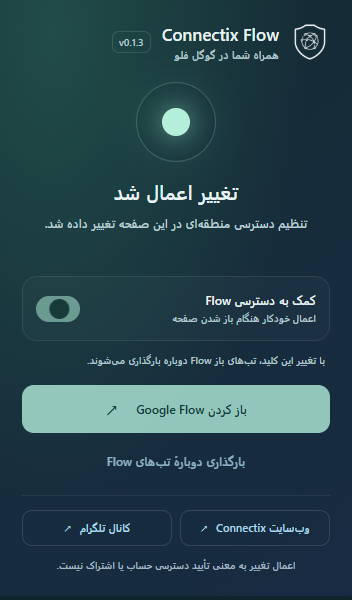
Open the extension and see where things stand.
Enabled by default, with your choice saved in the browser. The extension applies the local adjustment automatically when you open Flow.
See whether the page setting was changed, was already enabled, or needs an extension update. Status describes the local change on your current page.
Open Google Flow or reload your Flow tabs from the popup. A compact Persian interface keeps the controls close at hand.
Install Connectix Flow manually in desktop Chrome. This release comes as a ZIP file, with everything the extension needs inside.
Download v0.1.3Requires Chrome 111 or later.
Keep the extracted folder in a permanent location.
Download the ZIP above and extract it into a folder on your computer. You’ll find a file named manifest.json inside.
Type chrome://extensions into Chrome’s address bar and press Enter. Turn on Developer mode in the top right.
Click Load unpacked and select the extracted folder containing manifest.json. Connectix Flow will appear in your extensions.
Open Connectix Flow from Chrome’s extensions menu, then open Google Flow and sign in. Reload any Flow tabs you already had open, then check the popup’s status.
Save your work before changing the switch: turning the extension on or off reloads open Flow tabs.
The extension works locally on Google Flow pages. It has no analytics or remote configuration service, and does not collect cookies or upload prompts, tokens, or response contents.
No. Connectix Flow changes a local regional access setting in the page. It does not change your account country, subscription, credits, or Google’s server permissions. “Change applied” confirms the local update; account access and successful generation still depend on Google.
The extension works independently of the Connectix app and can be used alongside a VPN. It does not create a VPN connection or change your IP address.
Download the latest ZIP, extract it, and replace the files in the same folder you originally installed. Go to chrome://extensions and click Reload on Connectix Flow. Reopen the popup to check its version, then reload your Flow tabs. Follow our Telegram channel for updates.
Google may change how Flow works. When the extension does not recognize the page’s settings, it leaves them unchanged. Check for a newer extension version. If you use another extension that modifies Flow, disable it while troubleshooting.
This release is available as a ZIP for manual installation. Follow the steps above in desktop Chrome 111 or later.
Find Connectix news and extension updates on our Telegram channel.